Soundscape
Navigation
A mindful new way to walk — guided by sound, not just a screen.
A concept feature for Google Maps that adds a subtle, customizable audio layer to walking navigation — helping people look up from the blue dot, learn their surroundings, and rebuild the spatial instincts GPS has quietly eroded.
- My Role
- UX Research & Design
- Timeline
- End-to-end concept
- Platform
- iOS · Walking Nav
- Scope
- Research → Hi-Fi Prototype
The problem
We're outsourcing our sense of direction — and our brains feel it.
Turn-by-turn GPS is so convenient that we've stopped building our own mental maps. Researchers call it spatial cognitive deskilling: the more we lean on the app, the less our brains engage with the world. There's even a word for it — the Japanese hōkō onchi, "deaf to direction."
Spatial thinking isn't just navigation — it's a foundational skill that helps us structure ideas, integrate new information, and recall memories in context. When GPS does the work, that muscle weakens.
Problem statement
Convenience came at the cost of how we know a place.
Maps have guided human movement for millennia, helping people read landscapes and build their own sense of direction. Today, GPS-based navigation systems like Google Maps do most of that work for us. This convenience comes with a cost of weakening spatial memory and wayfinding skills. Visual-first maps reduce the city to a line on a screen, leaving little room for the textures, rhythms, and sounds of a place that help people orient themselves, feel present, and form lasting connections to their environment.
The process
Quantitative data
Google Maps owns the walk — so it's the right place to fix this.
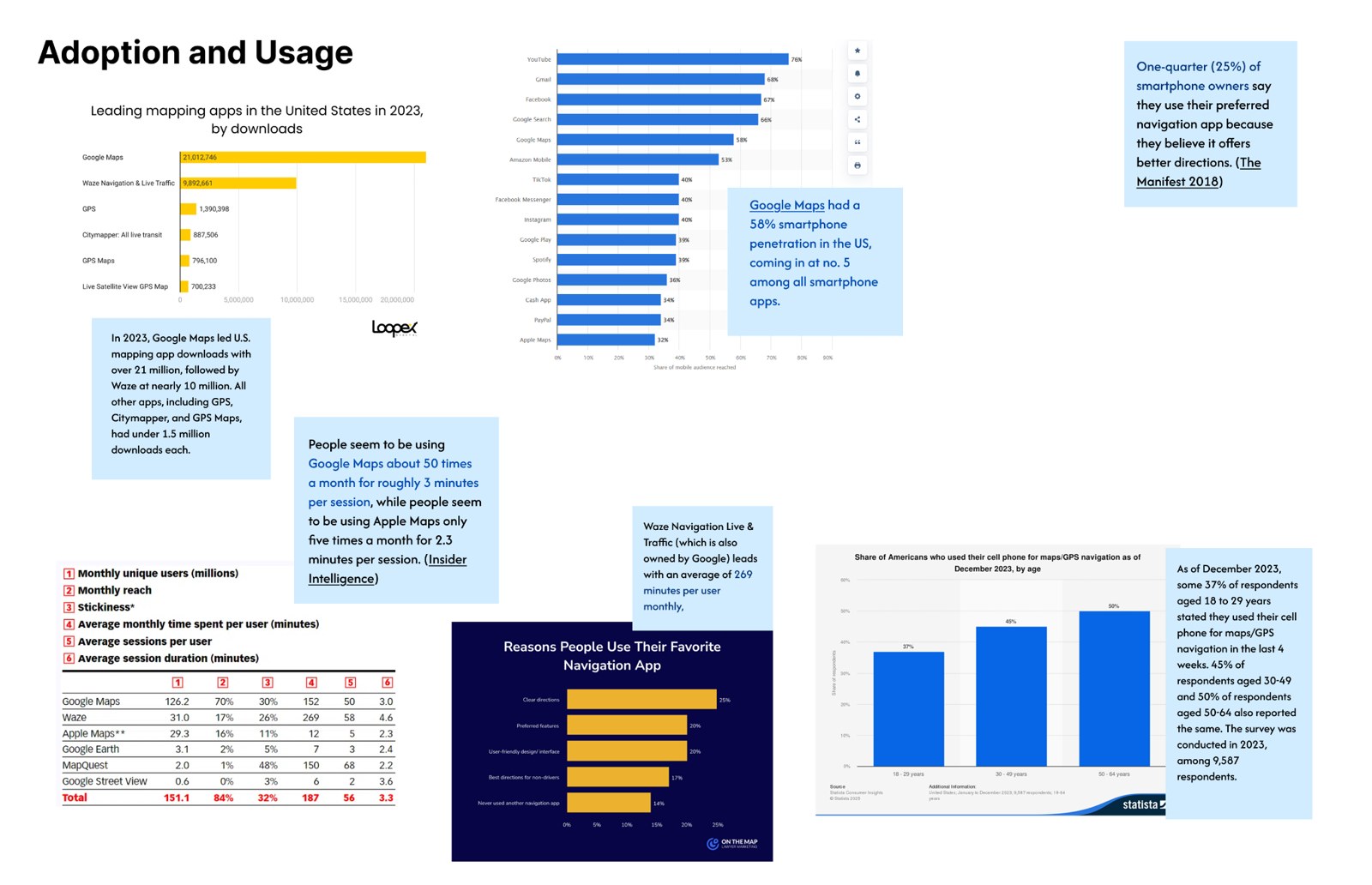
To change how people navigate on foot, go where they already are. Google Maps has roughly 50% US smartphone penetration, opened ~30 times a month, ~3 minutes at a time — far more than any competitor.
Strength & inspiration in the wild
Borrow the best of Waze and Apple Maps — without the car-first noise.
Unmatched data and reach — but visual-first and cluttered for walking.
User-generated alerts, focus on what's ahead, bold at-a-glance icons, a clear route-focused layout.
Low-clutter interface, custom saved walking routes, consistent elevation, immersive Look Around.
The design question: how do we bring real-time awareness and spatial calm together — without inheriting the visual overload or the car-first bias?
What users told us
Four findings.
Key Insights
Navigation needs to be more than a blue dot.
Screen fatigue
People feel forced to stare at their phones while walking — hurting safety and the journey itself.
Limited audio
Voice guidance is purely functional turn-by-turn; it doesn't support spatial awareness or atmosphere.
Missed context
People arrive without knowing the neighborhood they moved through. They miss the feel of the place.
How might we
Three questions to design against.
Ideation
We bet on audio.
Mapping our thinking: audio kept surfacing as the modality with the most untapped room — and landmarks as the thing people trust when the screen fails. Audio + Landmarks is where the idea landed.
50% of users said they liked the audio feature — and 50% said they didn't.
Landmarks are the tool people most commonly use when navigating without their phones.
User flow
One feature, placed where you'll actually find it.
Google Maps is already robust, so I mapped a user flow to place Soundscape within reach every time the app opens. Mid-fidelity testing pushed us multi-modal: someone new to a city wants storytelling; a daily commuter wants a quiet tonal cue. Different priorities, different modes.
The solution
Walk by Ear, Not Just by Screen.
A light, optional audio layer — with your phone in your pocket, you can follow the route by ear, stay present in the neighborhood, and feel the city instead of just watching the screen. Four modes let people match the guidance to how they want to move through a place.
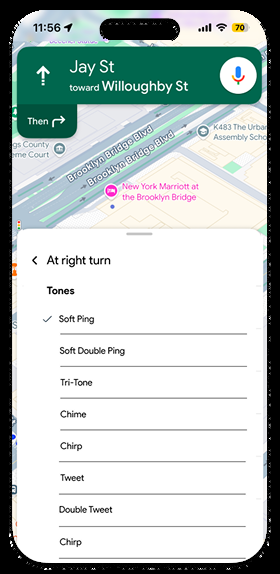
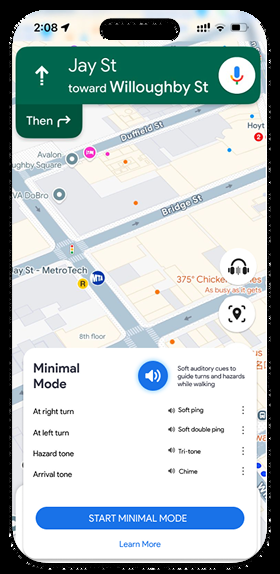
A no-frills cue system: brief, customizable tones at turns and key moments — no commentary, no ambient sound. The goal is quiet directional vigilance.
Guided narration keeps you informed about the area and its landmarks, so you understand where you are in relation to what you pass.
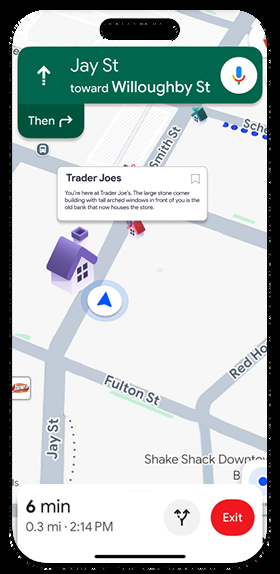
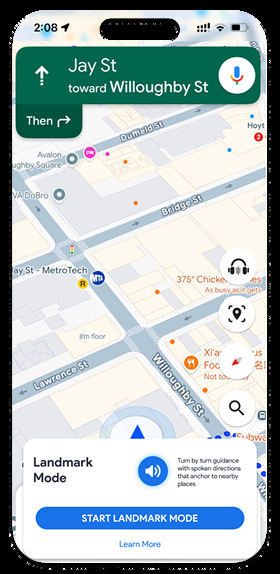
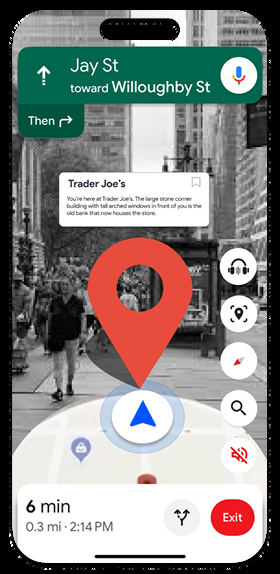
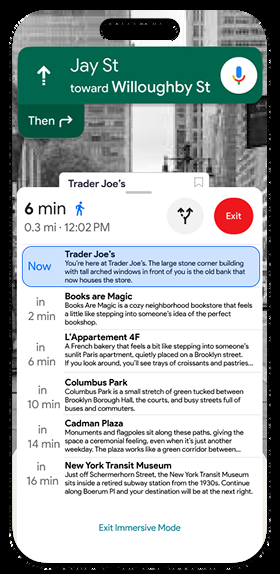
Ambient sound and storytelling become the navigation cue. On-screen visuals mirror what you see in real life, so landmarks are easy to recognize — building a mental map as you go. Sounds tied to a place fade in as you approach.
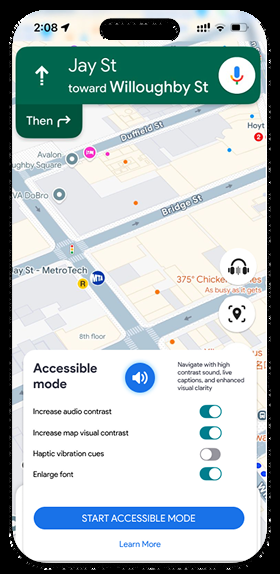
Navigation you can feel, not just hear. Every cue works across text and haptics; sound is optional and never masks real-world audio. Spoken info is always captioned; tones are simple, low-to-mid, one clear meaning each.
Usability feedback
Findings.
Reflection
What I'd do next.
I'd build out the detailed UI of each mode, and go deeper on the Accessible mode specifically — by talking directly to users with disabilities, so the experience is shaped by the people it's meant to serve rather than assumptions about them.
Honestly? This was so much fun to build and work on. Special thanks to Sana Maqsood — Lead UX Designer @ Amazon.
Navigation you can feel your way through — not just stare at.